

Learn why the 6 Best Form Types for Every Business Website are important for boosting conversions, capturing leads, and improving business growth.
Every business website needs strong, simple, and high-converting forms because website forms work as the main bridge between a customer and a business. When I visit a website, the first thing I notice is how easy it is to contact the company, join a newsletter, register for an event, or place an order, and all of this happens through forms. From a business point of view, these business website forms, lead generation forms, and high-converting forms help collect important customer data, increase online sales, improve user experience, and build trust among visitors. In the digital world, forms act as the foundation for customer engagement and conversion rate optimization.
Whether it is a newsletter sign-up form, sales contact form, customer feedback form, or an online order form, each form type plays a powerful role in growing a business online. Businesses that use optimized forms often see higher conversion rates, better brand communication, more customer insights, and stronger digital marketing results. Using the right website form types not only improves engagement but also supports SEO, marketing automation, and long-term online growth.
A newsletter sign-up form is one of the most essential lead generation forms on any business website. It allows users to enter their basic details—usually name and email—to receive updates, offers, announcements, and marketing content directly in their inbox. From my experience, a strong newsletter sign-up form is like creating a long-term connection with customers because email remains one of the highest converting digital marketing channels.
Businesses use newsletter forms to build email lists, increase website return traffic, send personalized content, and promote services. When a user fills out this form, it shows interest, trust, and willingness to engage with the brand. That is why newsletter sign-up forms are considered one of the most powerful and high-converting form types for websites.
Every business needs a newsletter sign-up form because it helps in building a strong communication channel with the audience. Companies use newsletters to share valuable updates, new product launches, seasonal offers, blog posts, and useful content that increases brand awareness. As a marketer, I know that email marketing still gives one of the highest returns on investment, which is why collecting emails using newsletter sign-up forms, subscriber forms, and email opt-in forms is extremely important. With this form, businesses can create targeted email campaigns, build trust, and boost customer loyalty. Even small businesses can benefit from having an email list because it gives them the power to reach customers anytime without spending money on ads.
A high-converting newsletter form should include simple and clean fields like name, email, and a strong call-to-action button such as “Subscribe Now,” “Join Free,” or “Get Weekly Tips.” Adding incentives such as free eBooks, discounts, or exclusive content also increases conversions. Businesses should make sure the form loads fast, works on mobile, and shows clear value so visitors feel motivated to sign up.
Newsletter forms work best when placed on the homepage, blog pages, sidebar, footer, exit popup, or after an article. Many businesses also place the form above the fold so visitors see it immediately.
Short forms, attractive design, social proof, trust badges, and strong CTAs help increase sign-ups. Using ranking keywords like email marketing, newsletter sign-up, lead generation forms, and website conversions also helps in SEO.
A sales contact form is one of the most important business inquiry forms because it allows customers to contact a business for product details, service inquiries, price quotes, and business deals. When I fill out a sales form on a website, it means I want more information and I am ready to take the next step. From the company’s side, this form becomes a direct lead-generation tool that captures valuable information that sales teams can use to follow up. Businesses that use high-converting contact forms often receive more inquiries, more quote requests, and more sales opportunities because the form makes it easy for potential customers to reach them.
Sales contact forms are designed to convert website visitors into leads. These forms help businesses collect customer information like name, phone number, email, budget, and message. With this data, sales teams can understand customer needs and respond effectively. I have seen that a clear, user-friendly, and responsive contact form increases leads dramatically because customers prefer quick communication. When the form is optimized with ranking keywords like contact form, sales inquiry, business website forms, and service request form, it also improves SEO and brings more potential leads.
The form must have fields such as full name, email, mobile number, company name, budget, and a message box where customers can describe their requirements. A simple form with fewer fields usually performs better than a long and complicated one.
For better conversions, the form should load fast, allow autofill, include validation, and have an attractive CTA. Adding a “We respond within 24 hours” message increases trust. Mobile optimization is also extremely important because many users fill forms using their phone.
Businesses should avoid asking too many unnecessary details, using confusing layouts, adding slow-loading elements, or failing to send confirmation messages. Every form must give a clear success message after submission.
Event registration forms are essential for businesses that conduct webinars, workshops, training sessions, conferences, meetups, and online events. These forms help manage attendance, collect user information, and track participant details. As someone who has filled many event forms, I know how important a smooth signup experience is. From the business side, event registration forms help them organize events professionally, build email lists, market future events, and increase engagement. These forms also help in automation because they can send instant confirmation messages, reminders, and event details to participants.
Event forms are useful for different types of events such as live workshops, online webinars, educational classes, training programs, product demos, community sessions, and networking events. Each event requires specific fields, design, and user flow depending on the type of event.
The form often includes fields like name, email, phone number, date selection, event choice, ticket type, and payment option. If it is a paid event, secure payment integration is necessary.
Once a user registers, they should receive instant confirmation with details like event name, time, link, and instructions. Automated email reminders help increase attendance rates and reduce last-minute confusion.
Shorter forms, clean design, mobile-friendly layout, strong CTAs, and trust badges help reduce form abandonment. Adding ranking keywords like event registration form, webinar signup form, and online event forms also improves search ranking.
Customer feedback forms help businesses understand customer experience, improve services, and fix issues. When I fill out a feedback form, I know the company values my opinion. For businesses, feedback forms provide insights into customer satisfaction, pain points, and expectations. These forms are extremely helpful for customer support, product teams, quality analysis, and marketing strategies. Companies that use feedback forms, customer satisfaction surveys, and review forms can build stronger relationships with customers.
Businesses use many types of feedback forms such as star rating forms, satisfaction surveys, product review forms, service rating forms, and suggestion forms. Each form type helps collect different insights that improve overall service quality.
A customer feedback form must include fields like rating scale, comment box, experience description, optional email, and suggestions. Short and simple forms increase response rates.
Feedback helps businesses fix problems, improve services, and understand customer expectations. It also helps in product development and customer support improvement.
Feedback forms work best in the footer, product pages, email newsletters, support section, and after a purchase.
An online order form is used to let customers place orders for products or services directly from the website. These forms are essential for eCommerce stores, restaurants, service providers, and subscription businesses. An online order form simplifies the purchase process and increases sales.
Every business should use an online order form to make ordering easy and fast. With this form, customers can choose products, enter address details, select payment options, and confirm orders within minutes. Businesses benefit from reduced manual work, better customer experience, and more online conversions. High-converting order forms help boost revenue, improve website optimization, and increase customer satisfaction.
Order forms include fields like product selection, quantity, address, city, pincode, payment method, and contact number. Payment options may include card payments, UPI, wallet, or cash on delivery.
To handle payments safely, websites must use SSL, PCI-compliant gateways, OTP verification, and encrypted data storage. Secure checkout always builds trust among users.
Most users shop on mobile, so the form must be fast, responsive, and easy to fill. Large buttons, clean design, and simple layout help improve the experience.
An account signup form allows users to create accounts on websites. These forms are important for eCommerce websites, membership platforms, online learning portals, and service-based websites. When users create an account, it becomes easier for businesses to track orders, personalize offers, and store preferences.
Businesses benefit from repeat customers, better analytics, personalized recommendations, and loyalty programs. Users enjoy faster checkout, order history, saved details, and personalized experiences.
Signup forms usually include name, email, password, phone number, and OTP verification. Adding social logins like Google or Facebook makes signup easier.
Short forms, auto-fill, strong CTAs, and simple design reduce abandonment and improve conversions.
1-click login options allow users to register instantly, increasing signup rates and improving overall website engagement.
Choosing the right form builder is important for creating high-quality forms. Popular tools include Google Forms, Jotform, Typeform, WPForms, and HubSpot Forms. The best tool should support customization, analytics, mobile optimization, secure data handling, CRM integration, and automation features. Businesses should choose tools that match their website needs and allow full flexibility for designing high-converting forms.
High-converting forms are short, simple, and optimized for user experience. Businesses must use strong CTAs, trust messages, validation, mobile optimization, and fast-loading design. A/B testing, clear labels, and minimal fields help improve performance. Using SEO keywords like high converting forms, lead generation forms, business website optimization, and website UX improves ranking.
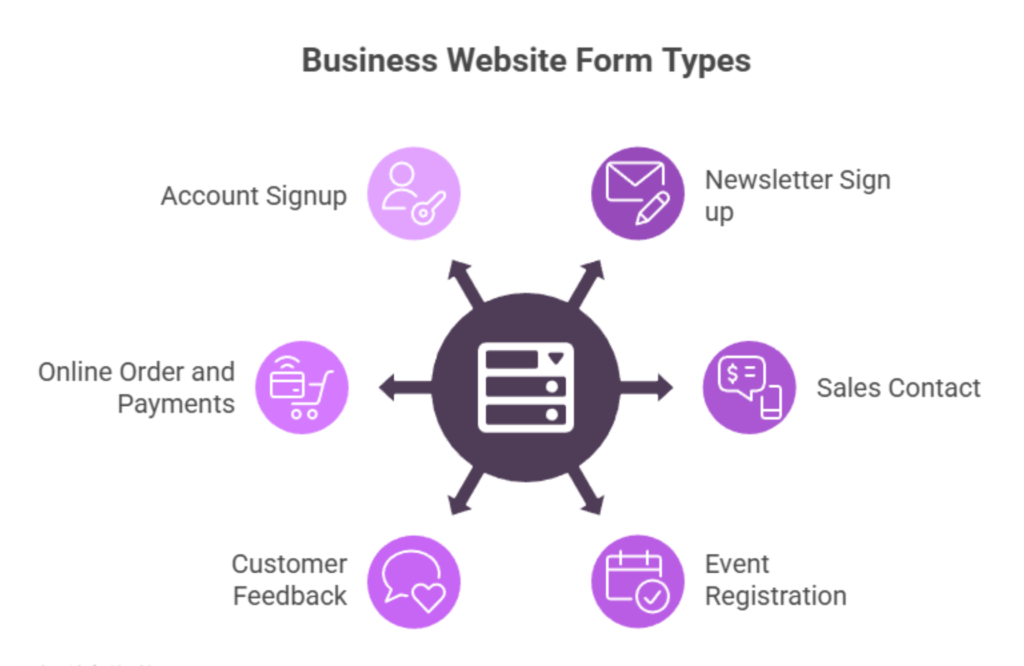
Forms are the backbone of every business website. Newsletter forms help build email lists, contact forms drive more sales inquiries, event forms manage registrations, feedback forms improve services, order forms increase sales, and signup forms boost customer engagement. I strongly believe that every business should use these forms to increase conversions, build trust, and grow faster. When optimized properly, these forms can turn any website into a powerful marketing and lead generation machine.
Website forms help businesses collect customer details, generate leads, and improve conversions. They make communication easy and support digital marketing efforts. Forms like contact, newsletter, and order forms help increase engagement and grow the business.
The best forms for lead generation are newsletter sign-up forms and sales contact forms. They capture email addresses and customer inquiries, helping businesses build a strong lead pipeline and increase conversions.
To increase form conversions, keep forms simple, short, mobile-friendly, and fast-loading. Use strong CTAs, trust messages, and clean design. Adding incentives like discounts can also boost sign-ups.
A contact form is for inquiries and questions, while a signup form creates a user account. Contact forms help generate leads, and signup forms help build long-term customer relationships and personalized experiences.
Google Forms, Typeform, Jotform, WPForms, and HubSpot Forms are great tools for creating website forms. They offer easy design, mobile-friendly layouts, analytics, and integration with marketing tools.