Have you ever noticed that your website appears in Google Search results thousands of times but receives only a few clicks? If yes, your Click-Through Rate (CTR) might be the reason.
CTR is one of the most important SEO metrics because it tells you how often people click your website after seeing it in Google Search. A higher CTR usually means your title and meta description are attractive and match what users are looking for.
The good news is that you can easily track your CTR using Google Search Console. This free tool from Google helps you understand which pages are getting clicks, which keywords have low CTR, and where you can improve your SEO.
Whether you are a blogger, business owner, digital marketer, or SEO beginner, learning how to analyze and improve your Google Search Console CTR can help you attract more visitors without creating new content.
In this complete guide, you’ll learn what CTR is, how Google Search Console calculates it, where to find it, what a good CTR looks like, and practical ways to improve it to increase your organic traffic.
What Is CTR (Click-Through Rate)?
Click-Through Rate (CTR) is the percentage of people who click on your website after seeing it in Google Search results. It measures how effective your page title, meta description, and search appearance are at encouraging users to visit your website.
In simple words, CTR answers one question:
“Out of everyone who saw my page in Google, how many actually clicked it?”
For example, if your page appeared in Google Search 1,000 times and 80 people clicked it, your CTR would be 8%.
A high CTR usually means your content matches the user’s search intent and your title stands out from other search results. On the other hand, a low CTR may indicate that your title isn’t compelling enough, your meta description needs improvement, or your page isn’t ranking in a position where users are likely to click.
CTR Formula
CTR = (Clicks ÷ Impressions) × 100
Example
Metric
Value
Impressions
2,000
Clicks
100
CTR
5%
This means your webpage was shown 2,000 times in Google Search, and 100 users clicked it.
Understanding the Three Important Metrics
Before you improve your CTR, it’s important to understand three key metrics in Google Search Console.
Impressions
An impression is counted every time your webpage appears in Google’s search results, even if nobody clicks on it.
Clicks
A click is recorded when someone selects your website from the search results and visits your page.
CTR
CTR is simply the percentage of impressions that turned into clicks.
These three metrics work together. If your impressions are increasing but your clicks stay the same, your CTR will decrease. If your clicks increase while impressions remain stable, your CTR will improve.
Why Is CTR Important for SEO?
CTR is more than just a percentage. It helps you understand how attractive your search listing is to potential visitors.
A good CTR can help you:
Bring more organic traffic without publishing additional content.
Identify pages that need better titles or meta descriptions.
Understand which keywords attract the most visitors.
Improve the overall performance of your SEO strategy.
Discover opportunities to optimize underperforming pages.
Even if your website ranks on the first page, a poor CTR means you’re missing valuable traffic that could be coming to your site.
What Is Google Search Console CTR?
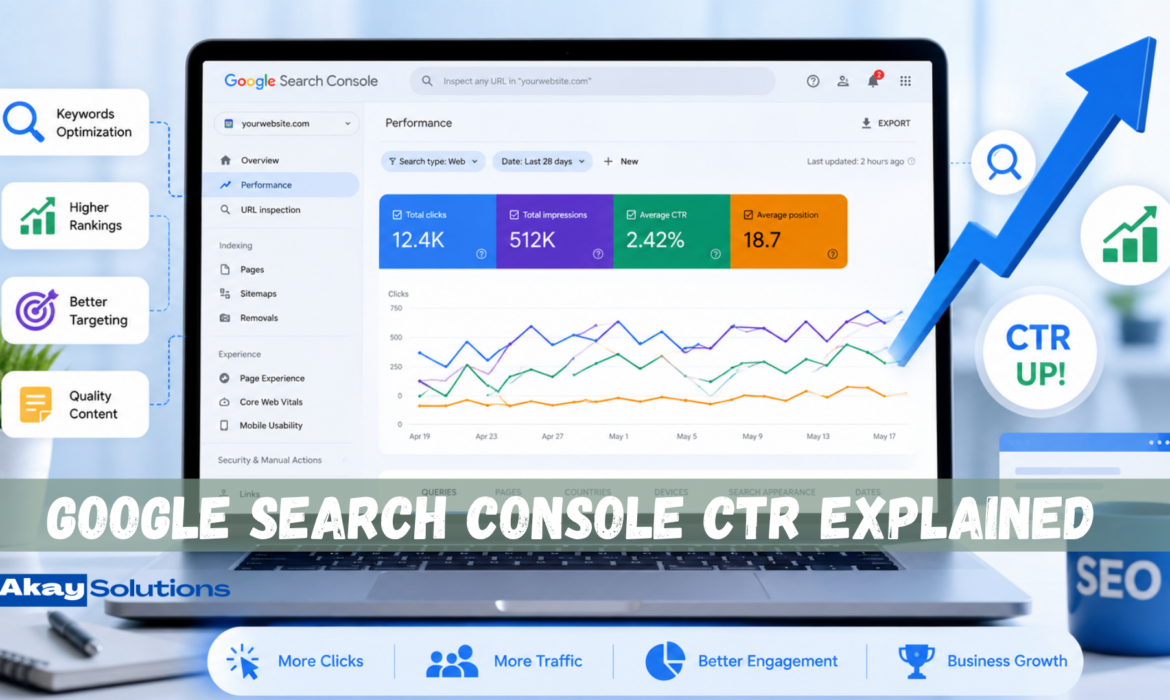
Google Search Console CTR is the average percentage of clicks your website receives from Google’s organic search results. It is one of the four main performance metrics shown in the Performance report, alongside Clicks, Impressions, and Average Position.
Unlike paid advertising metrics, Google Search Console CTR only measures clicks from organic search results. It does not include clicks from Google Ads or other advertising platforms.
For example, if your website appeared 5,000 times in Google Search during the last 28 days and users clicked your pages 250 times, Google Search Console would report an average CTR of 5%.
This metric helps you understand how well your pages attract attention in search results.
Where Can You Find CTR in Google Search Console?
You can view your CTR by following these steps:
Sign in to your Google Search Console account.
Select your website property.
Click Performance from the left-hand menu.
Open Search Results.
Enable the Average CTR metric at the top of the report.
You can now analyze CTR by:
Search queries
Individual pages
Countries
Devices
Search appearance
Date range
This makes it easy to identify which pages are performing well and which ones need optimization.
Why Does Google Search Console CTR Matter?
Google Search Console CTR helps you answer important SEO questions, such as:
Which pages get the most clicks?
Which keywords have high impressions but low CTR?
Which blog posts need better SEO titles?
Which pages should be updated first?
How are your recent SEO changes affecting user behavior?
Instead of guessing, you can use real data to improve your content and increase organic traffic.
Google Search Console CTR vs Google Ads CTR
Many beginners confuse these two metrics, but they are different.
If you’re working on SEO, the CTR shown in Google Search Console is the one you should focus on.
How Is CTR Calculated?
Google Search Console uses a simple formula to calculate your Click-Through Rate.
CTR = (Clicks ÷ Impressions) × 100
Although the formula is simple, understanding it helps you interpret your SEO performance correctly.
Example 1
Your blog appears in Google Search 500 times.
Users click your page 25 times.
CTR = (25 ÷ 500) × 100 = 5%
This means that 5 out of every 100 people who saw your page clicked it.
Example 2
Your service page appears 8,000 times.
It receives 640 clicks.
CTR = (640 ÷ 8,000) × 100 = 8%
This indicates that your title and meta description are attracting a good percentage of searchers.
Example 3
Your article receives:
20,000 impressions
200 clicks
CTR = (200 ÷ 20,000) × 100 = 1%
A CTR of 1% suggests that although many people see your page, very few click on it. This could mean your title isn’t compelling, your page doesn’t match user intent, or you’re ranking lower on the search results page.
Looking at CTR together with impressions and average position helps you decide what to optimize first.
What Is a Good CTR in Google Search Console?
One of the most common questions website owners ask is, “What is a good CTR?” The answer is that there is no single number that works for every website.
A good Click-Through Rate depends on several factors, including your ranking position, industry, competition, search intent, and the type of keyword. For example, pages ranking in Position #1 usually receive a much higher CTR than pages ranking in Position #8, even if both pages have excellent content.
Instead of comparing your CTR with other websites, compare your own pages. If one page has a CTR of 8% and another similar page has only 2%, you should analyze what makes the higher-performing page more attractive.
Average CTR by Ranking Position
Remember that these are general trends. Your actual CTR may be higher or lower depending on your niche and how your page appears in search results.
Factors That Affect CTR
Several elements influence your Click-Through Rate:
Your Google ranking position.
A strong and engaging SEO title.
A clear and persuasive meta description.
Search intent matching.
Rich results and schema markup.
Brand recognition.
Competition on the search results page.
Featured snippets and AI-generated summaries.
If you optimize these factors, your CTR can improve even without moving to a higher ranking position.
Why Is My CTR Low?
Many websites receive thousands of impressions but only a small number of clicks. This doesn’t always mean your content is poor. In many cases, small SEO improvements can significantly increase your CTR.
Here are the most common reasons for a low Click-Through Rate.
1. Your SEO Title Is Not Attractive
Your title is the first thing users notice in Google Search.
A title that is too generic or unclear will often be ignored, even if your page ranks well.
Poor Example
Best SEO Tips
Better Example
15 Proven SEO Tips to Increase Organic Traffic in 2026
The second title gives users a clear reason to click.
2. Your Meta Description Doesn’t Encourage Clicks
Although Google sometimes rewrites meta descriptions, a well-written description can still improve your CTR.
Your meta description should clearly explain what readers will learn and encourage them to visit your page.
3. Your Ranking Position Is Low
Pages ranking in positions 7–10 naturally receive fewer clicks than pages in the top three positions.
If your page ranks lower, improving your content quality and building authority can help increase visibility over time.
4. Your Content Doesn’t Match Search Intent
Google wants to show results that satisfy the user’s search.
If someone searches for:
“How to improve CTR”
but your article only explains what CTR means, users may skip your page because it doesn’t answer their question.
Always understand what the searcher expects before creating content.
5. Your Competitors Have Better Titles
Even if your page ranks above a competitor, users may click their result if their title looks more useful or trustworthy.
Compare your title with the top-ranking pages and identify ways to make yours more compelling without using clickbait.
Schema helps search engines better understand your content.
Useful schema types include:
FAQ Schema
Article Schema
Breadcrumb Schema
Structured data may improve your search appearance.
11. Refresh Old Content
Google prefers content that stays accurate and up to date.
Update:
Statistics
Examples
Screenshots
Dates
Internal links
Refreshing content can improve both rankings and CTR.
12. Improve Page Speed
A slow website can reduce user satisfaction.
Although speed doesn’t directly increase CTR in search results, it improves the overall user experience after users click your page.
13. Build Brand Trust
People often click websites they recognize.
You can build trust by:
Publishing helpful content regularly.
Maintaining consistent branding.
Earning quality backlinks.
Collecting genuine reviews.
Over time, stronger brand recognition can positively influence CTR.
14. Use Strong Internal Links
Internal links help users explore related content and strengthen your website’s topical authority.
Link to related articles naturally throughout your content.
15. Monitor CTR Regularly
Don’t optimize once and forget about it.
Review your Google Search Console data every month.
Look for:
Pages with high impressions and low CTR.
Keywords losing clicks.
New optimization opportunities.
Small improvements made consistently can lead to significant long-term growth.
CTR vs Other SEO Metrics
CTR is an important SEO metric, but it should never be analyzed by itself. To understand how your website is performing, you should compare CTR with other key metrics in Google Search Console and Google Analytics.
Each metric tells a different part of the story. When you combine them, you can identify why a page is performing well or where it needs improvement.
Example
Imagine two blog posts.
Article A
20,000 impressions
2% CTR
400 clicks
Article B
5,000 impressions
10% CTR
500 clicks
Although Article B has fewer impressions, it generates more clicks because its CTR is much higher.
This example shows why improving your CTR can increase traffic without needing more impressions.
Does CTR Affect Google Rankings?
This is one of the most debated questions in SEO.
The Short Answer
There is no official confirmation from Google that Click-Through Rate is a direct ranking factor. Google has repeatedly advised website owners to focus on creating helpful, user-first content rather than trying to manipulate click behavior.
However, CTR is still an important performance metric because it reflects how appealing your search result is to users.
Why CTR Still Matters
Even if CTR isn’t a direct ranking signal, improving it can benefit your SEO in several ways.
A higher CTR means:
More visitors reach your website.
More people engage with your content.
More opportunities to earn backlinks and shares.
Better data for identifying successful pages.
Stronger overall organic performance.
Instead of asking, “Does CTR improve rankings?”, ask:
“How can I make my search result more useful and attractive to users?”
That mindset leads to better SEO over the long term.
Best Tools to Analyze CTR
Tracking your CTR regularly helps you discover pages that can generate more traffic with small improvements.
Here are some of the best tools for analyzing Click-Through Rate.
1. Google Search Console
Google Search Console is the most important tool for tracking organic CTR.
It shows:
Clicks
Impressions
Average CTR
Average Position
Queries
Pages
Devices
Countries
If you’re serious about SEO, this should be your primary source of CTR data.
2. Google Analytics
Google Analytics helps you understand what users do after they click your website.
You can measure:
User engagement
Session duration
Conversions
Landing page performance
Traffic sources
Using Google Analytics together with Google Search Console gives you a complete view of your SEO performance.
3. Ahrefs
Ahrefs is a popular SEO platform that helps you monitor keyword rankings, backlinks, and competitor performance.
It can help you:
Identify pages losing traffic.
Discover new keyword opportunities.
Analyze competitors.
Improve your SEO strategy.
4. SEMrush
SEMrush offers detailed keyword research and competitor analysis.
You can use it to:
Track keyword positions.
Analyze competitors.
Perform site audits.
Discover content opportunities.
5. Microsoft Clarity
Microsoft Clarity helps you understand how users interact with your website.
Features include:
Heatmaps
Session recordings
User behavior insights
Scroll tracking
While it doesn’t measure CTR directly, it helps explain what users do after clicking your page.
Common CTR Mistakes to Avoid
Many website owners unknowingly reduce their Click-Through Rate by making small SEO mistakes.
Avoid these common issues:
Writing generic page titles.
Using duplicate title tags.
Ignoring meta descriptions.
Stuffing keywords unnaturally.
Publishing outdated content.
Creating titles that don’t match the page content.
Ignoring search intent.
Forgetting to monitor Google Search Console data.
Fixing these problems can lead to noticeable improvements in your organic traffic.
Frequently Asked Questions
What is CTR in Google Search Console?
CTR (Click-Through Rate) is the percentage of users who click your webpage after seeing it in Google’s organic search results.
How is CTR calculated?
CTR is calculated using this formula:
CTR = (Clicks ÷ Impressions) × 100
For example, if your page receives 100 clicks from 2,000 impressions, your CTR is 5%.
What is considered a good CTR?
There is no universal benchmark. A good CTR depends on your ranking position, industry, competition, and search intent. Instead of comparing your website with others, focus on improving your own pages over time.
Can I improve CTR without improving rankings?
Yes.
Updating your title, improving your meta description, matching user intent, and using better headlines can increase CTR even if your ranking position remains the same.
Does CTR affect SEO?
CTR helps you measure how attractive your search result is. While Google has not confirmed it as a direct ranking factor, improving CTR can increase organic traffic and provide valuable insights for SEO optimization.
Conclusion
Google Search Console CTR is one of the most valuable metrics for measuring your website’s performance in organic search. It shows how effectively your pages attract clicks after appearing in Google Search results.
A low CTR doesn’t always mean your content is poor. In many cases, improving your SEO title, writing a stronger meta description, matching search intent, and refreshing outdated content can significantly increase your Click-Through Rate.
Remember that SEO is an ongoing process. Monitor your CTR regularly, analyze your best-performing pages, and continue testing improvements over time. Even small increases in CTR can result in more organic traffic, better user engagement, and greater opportunities to grow your website.
If you consistently create helpful, user-focused content and optimize your search listings, you’ll be well-positioned to improve your visibility in both traditional search results and AI-powered search experiences.